
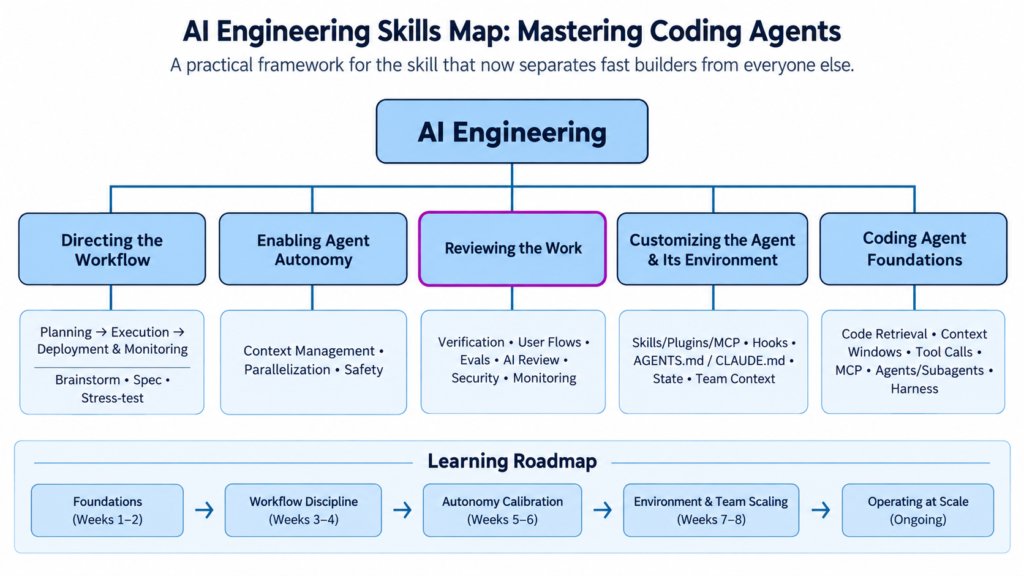
Why This Skill Matters
Using coding agents well is quickly becoming a core AI engineering competency — arguably the one evolving fastest of all of them. Your ability to steer an agent, not just to write code but to handle adjacent work like data analysis or system operations, directly determines how much you can ship.
That skill is a moving target. Proprietary agents (Claude Code, Codex, Cursor) and open agents (OpenCode, Pi) improve constantly through both harness design and underlying model quality. There’s no “learn it once” here — staying sharp means treating your own agent workflow as something you continuously experiment with, rebuild, and refine.
Drawing on interviews with dozens of top AI engineers, plus lessons from building with these tools day to day, a consistent high-level workflow emerges for shipping software with coding agents.
The Three-Stage Workflow
1. Planning
- Brainstorm — research, prototype, and build an understanding of the existing codebase (if one exists).
- Write a spec — capture requirements, technical design, and architecture, then turn that into an execution plan.
- Stress-test the plan — interrogate key assumptions and check for security gaps, overengineering, and blind spots before writing a line of code.
2. Execution
- Build — have the agent do the work, at a deliberately chosen level of autonomy.
- Verify — confirm the output through automated checks, human review, or both.
3. Deployment & Monitoring
- Deploy — often gated behind CI/CD or a human sign-off.
- Monitor — use agents to watch logs, flag issues, and propose (or even execute) fixes.
This mirrors the pre-agent software lifecycle almost exactly. What’s changed is where your attention goes: less time on typing code, far more time on deciding what to build, shaping the architecture, writing the spec, and verifying what comes out the other end.
A key nuance: the weight given to each stage varies enormously by project. A greenfield prototype might get a spec that’s really just a well-written prompt. A brownfield system with real users demands a spec you actually iterate on and pressure-test. And the whole loop is non-linear — a failed verification step sends you back to execution; a monitoring alert might send you all the way back to planning. Knowing when to loop back is itself a skill.
The Five Core Skills
1. Directing the Workflow
Knowing how to navigate the three stages above — how much human effort vs. agent effort each deserves, and when to circle back. This means weighing speed, cost, technical risk, and human effort together: how much up-front research is warranted, where you keep ownership yourself, how you pick an architecture, how much detail belongs in a spec, and how you break work into steps you can actually verify.
2. Enabling Agent Autonomy
Choosing how much leash to give the agent — tight interactive back-and-forth, or a larger delegated chunk with a clear success condition to loop against. This includes:
- Context management — deciding when key learnings, user feedback, and changed assumptions need to be captured so the agent can use them later.
- Parallelization — running multiple agents on a decomposed task, whether orchestrated by a human or by a higher-level agent, and managing your own attention across those concurrent sessions.
- Safety — setting permissions and gating risky actions so you move fast without risking leaked secrets, data loss, or other damage.
3. Reviewing the Work
Agent output is inherently uncertain — you don’t know in advance which bugs it will introduce or which good ideas it will surprise you with. This skill covers:
- Designing verification that matches the task — behavioral and functional checks.
- Testing real user flows, sometimes having the agent produce screenshots as evidence.
- Using eval sets and LLM-as-judge for qualitative work.
- Deciding what to automate vs. what still needs a human eye — and evolving your tests when they stop matching your actual goals.
- Running agentic code review and AI-driven security/architecture audits, reserving human review for where AI review falls short.
- Verifying deployments and operationalizing monitoring and incident response.
4. Customizing the Agent and Its Environment
Your agent is only as good as the environment you give it. This means:
- Integrating (and periodically pruning) skills, plugins, and MCP servers.
- Using hooks to automate recurring steps like code review or CI/CD triggers.
- Maintaining standing context files (
AGENTS.md,CLAUDE.md) with architecture notes, code style, and data-access patterns. - Preserving state across sessions and parallel agents, and running retrospectives to capture what worked.
- Keeping the codebase itself navigable — clear conventions, and regular cleanup of agent-generated debt.
- Coordinating context across a team’s individual agent setups.
5. Coding Agent Foundations
The mechanical understanding that makes everything else possible: how agents search and retrieve code, how they manage context windows, how tool calls and MCP servers affect that context, how agents and subagents interact, and how a harness wraps around the underlying model. This foundation is what lets you:
- Recognize failure modes — overengineering, lost rigor from a missing verification step, stopping short of the goal, or actions that risk destroying files or production data.
- Reason about the agent’s current state and steer it with the right prompt or context injection.
- Spot, mid-run, when an agent has gone off track and needs an intervention.
A Word of Caution on Autonomy Hype
Social media tends to oversimplify this. Yes, letting an agent run autonomously for hours and burn tens of millions of tokens is sometimes the right call. But the practical value of very long-horizon, low-supervision runs — especially weighed against their cost — is often overstated. In practice, effective coding-agent use is messy and iterative, and the people getting the best results are the ones intervening with well-calibrated judgment, not the ones stepping back the most.
What the Original Framework Leaves Out
The core five-skill map is solid, but a few things are worth adding if you want this to function as an actual skills roadmap rather than a description of expertise:
- Cost and token economics. “Enabling autonomy” mentions token burn in passing, but managing spend — knowing when a $0.50 task is being solved with a $40 agent run — is becoming its own discipline as usage scales across a team.
- Prompt/spec engineering as a distinct craft. Writing specs and prompts that agents execute reliably (naming exact files, defining “done,” pointing at existing patterns instead of describing them) is different enough from traditional requirements-writing that it deserves explicit practice, not just a mention inside “planning.”
- Multi-agent orchestration patterns. The original touches on parallel agents but not the concrete patterns — fan-out/fan-in, subagent specialization (e.g., a dedicated reviewer agent), or using one agent to supervise others.
- Team and organizational rollout. Individual skill is one thing; getting a team to converge on shared conventions, shared
CLAUDE.md/AGENTS.mdfiles, and consistent review gates is a separate, harder problem the framework only gestures at. - Security posture as a first-class concern, not a subskill of “reviewing the work” — permission scoping, secrets handling, and blast-radius limiting deserve their own checklist given how much damage an overly autonomous agent can do.
- Evaluation of the agent itself over time. Beyond reviewing individual outputs, tracking how an agent/harness combination performs across weeks or months — since both evolve fast — helps you decide when to switch tools or upgrade configurations.
A Learning Roadmap
Stage 1 — Foundations (Weeks 1–2)
- Learn how one agent actually works end to end (context window behavior, tool-calling, retrieval). Claude Code is a good default choice to study deeply.
- Practice writing tight, scoped prompts: name the file, the scenario, and the test that proves success.
- Get comfortable with plan/read-only mode before letting an agent write.
Stage 2 — Workflow Discipline (Weeks 3–4)
- Run a real project through all three stages: plan → build/verify → deploy/monitor.
- Write your first spec and execution plan for a non-trivial feature, and deliberately review it for gaps before executing.
- Set up a
CLAUDE.md/AGENTS.mdfile for a real codebase — keep it short, specific, and testable.
Stage 3 — Autonomy Calibration (Weeks 5–6)
- Experiment with different autonomy levels on the same class of task and compare outcomes and cost.
- Set up one automated verification loop (tests, screenshots, or an eval set) that lets an agent self-check.
- Try running two agents in parallel on a decomposed task and practice managing your attention across them.
Stage 4 — Environment and Team Scaling (Weeks 7–8)
- Add hooks for a recurring task (auto code review, lint-and-fix, CI trigger).
- Integrate one MCP server or plugin relevant to your stack.
- If you’re on a team, align on shared context files and review conventions.
Stage 5 — Operating at Scale (Ongoing)
- Build a lightweight monitoring/incident loop where an agent watches logs and proposes fixes.
- Run periodic retrospectives on what’s working and prune stale skills/context.
- Re-evaluate your tool choice every few months — this space moves fast enough that last quarter’s setup may already be behind.
Resources
- Claude Code — Best Practices for Agentic Coding (Anthropic, official) — the canonical source on context management, plan mode, and scaling across sessions.
- Claude Code Documentation Index — full doc map for exploring specific features (hooks, MCP, permissions).
- Claude Code Best Practices community guide (GitHub) — community-distilled patterns, custom slash commands, and worktree-based parallel sessions.